Bell Curve Generator
Statistics
This bell curve generator builds a custom normal-distribution graph from just two numbers: the mean (μ) and the standard deviation (σ). Enter your values in the tool above and it draws the curve, marks the centre, and reports the 68% and 95% ranges.
Use it to check a set of scores, teach the shape of a normal distribution, or compare two data sets. If you have one score to place on a curve rather than a whole distribution, the Z-Score to Graph Plotter is the right tool for that job.
For the background to the 68–95–99.7 pattern, see what the empirical rule says. This page stays focused on building the graph itself.
What is a bell curve generator?
A bell curve generator draws the graph of a normal distribution for the mean and standard deviation you choose. The result is a smooth, symmetrical curve that peaks at the mean and tapers equally on both sides. Values near the mean are common; values far away, in the thin tails, are rare.
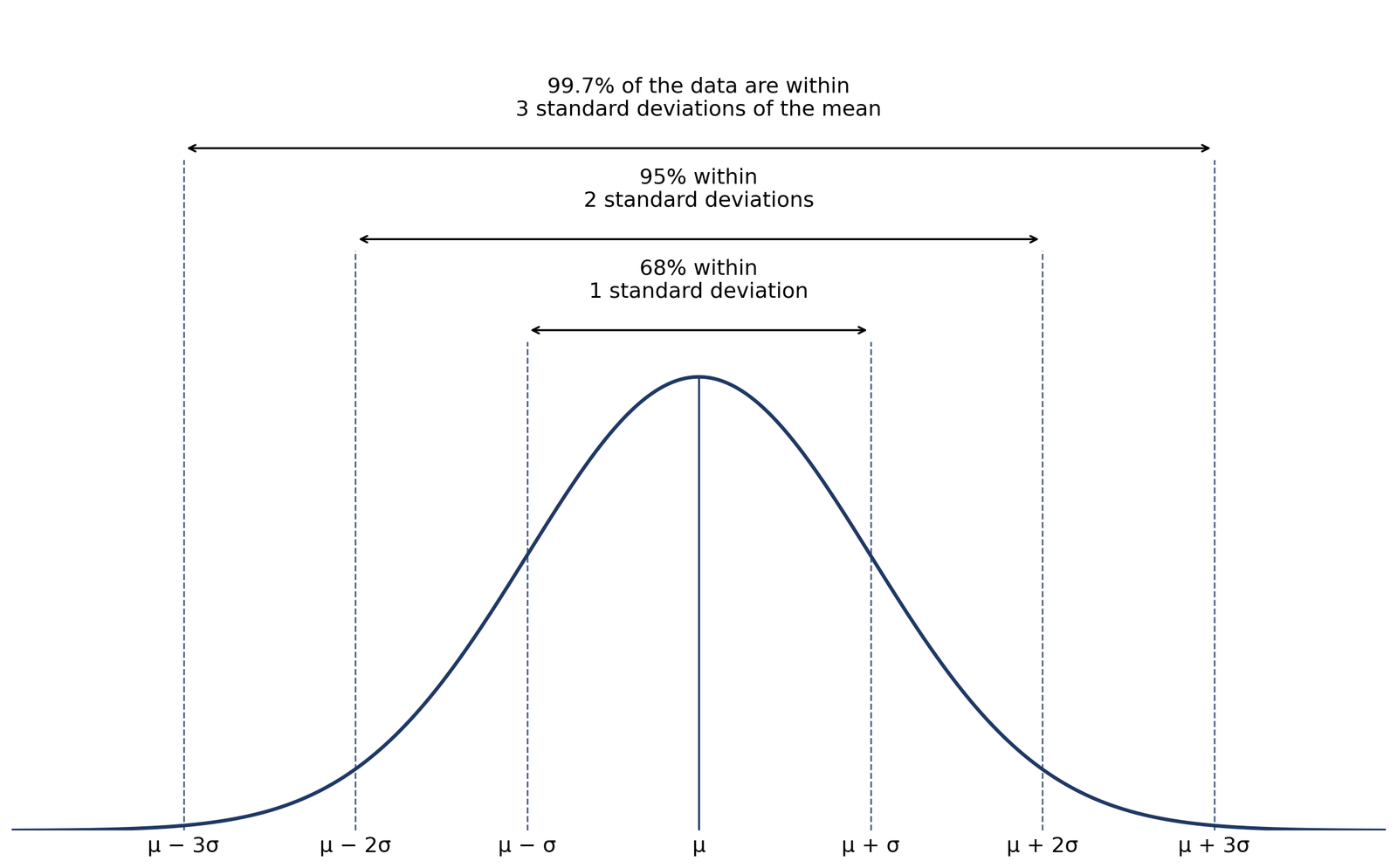
The generator does not need your raw data. It draws the theoretical curve defined by μ and σ, so you can see the shape, the centre and the spread before you compare it with real measurements. Real data are only approximately bell-shaped, and the diagram beside this text shows the ideal form.
Adult heights, standardised test scores and measurement errors are the classic examples: most values cluster near the middle, with fewer and fewer as you move away. The next sections show exactly how far the bulk of the values lie from the mean.
How to use the bell curve generator in 3 steps
Use the tool at the top of the page. You need only two numbers, and there is no sign-up and no spreadsheet to build.
- Step 1 — Enter the mean (μ). The mean is the centre of the curve. For IQ scores, for example, enter 100.
- Step 2 — Enter the standard deviation (σ). The standard deviation sets how spread out the curve is. It must be greater than zero. For IQ scores, enter 15.
- Step 3 — Click “Generate Bell Curve”. The chart redraws at once, and the Statistics box below it shows the 68% and 95% ranges for your values. Use “Download Chart as PNG” to save the chart.
Change either number and generate again to compare curves. If you want the areas under the curve shaded instead of a plain curve, use the standard deviation shading tool.
How the mean and standard deviation shape the curve
Two controls shape every curve this generator draws.
The mean (μ) moves the curve. Raise the mean and the whole curve slides to the right; lower it and it slides to the left. Its shape does not change at all — only its position on the horizontal axis changes.
The standard deviation (σ) stretches or squeezes the curve. A larger SD spreads values out, so the curve becomes wider and flatter, with a lower peak. A smaller SD concentrates values near the centre, so the curve becomes narrower and taller. Because the total area under the curve is always 100%, a wider curve must be lower and a narrower curve must be higher.
How to read the graph. The horizontal axis is the value being measured, and the peak sits at the mean. The height of the curve is probability density, not probability itself: probability is the area under the curve between two values. The thin tails are the rare values, far from the mean.
| Range around the mean | Share of values inside |
|---|---|
| μ ± 1σ | 68.27% |
| μ ± 2σ | 95.45% |
| μ ± 3σ | 99.73% |
| μ ± 1.96σ | 95% |
| μ ± 2.576σ | 99% |
The first three rows are the familiar 68–95–99.7 pattern, rounded. The last two rows
Four worked examples to try in the generator
Enter each pair in the tool at the top and click “Generate Bell Curve”. Each range below is mean ± 1 SD, mean ± 2 SD and mean ± 3 SD, in that order.
1. IQ scores — mean 100, SD 15. 68% range: 100 − 15 = 85 to 100 + 15 = 115. 95% range: 100 − 30 = 70 to 100 + 30 = 130. 99.7% range: 100 − 45 = 55 to 100 + 45 = 145. So most IQ scores fall between 85 and 115, and a score above 145 is exceptionally rare.
2. Class test — mean 72, SD 6. 68% range: 72 − 6 = 66 to 72 + 6 = 78. 95% range: 72 − 12 = 60 to 72 + 12 = 84. 99.7% range: 72 − 18 = 54 to 72 + 18 = 90. A mark of 90 is three standard deviations above the mean, at the top edge of the usual range.
3. Adult heights — mean 170 cm, SD 10 cm. 68% range: 170 − 10 = 160 cm to 170 + 10 = 180 cm. 95% range: 170 − 20 = 150 cm to 170 + 20 = 190 cm. 99.7% range: 170 − 30 = 140 cm to 170 + 30 = 200 cm.
4. Exam marks — mean 65, SD 8. 68% range: 65 − 8 = 57 to 65 + 8 = 73. 95% range: 65 − 16 = 49 to 65 + 16 = 81. 99.7% range: 65 − 24 = 41 to 65 + 24 = 89.
Examples gallery — quick-try pairs. IQ: mean 100, SD 15. Class test: mean 72, SD 6. Heights: mean 170, SD 10. Exam marks: mean 65, SD 8. Try each pair, then try a wider SD to see the curve flatten. To turn a range into a probability between two values, use the
Common Misconceptions About Bell Curves
Not all data is normally distributed. Income, reaction times and many count variables are skewed or follow other patterns. A bell curve is a model to check against data, not a default shape.
Real data are rarely perfectly symmetrical. Even approximately normal data show small bumps and asymmetry from sampling variation and measurement error. The smooth curve is the ideal form.
Standard deviation is not a probability. It measures spread around the mean. To get a probability you need the area under the curve over a range, not the SD on its own.
Curve height is not probability. Height is density. For a continuous variable, the probability of one exact value is zero; probabilities come from areas between values.
Values beyond 3 SD are rare, not impossible. About 0.27% of values lie outside μ ± 3σ. Before calling a far-out value an error, check it: see how to identify outliers using the empirical rule.
FAQs
A bell curve shows how values in a normal distribution are spread around the mean. Values near the mean are most common, and values far from the mean, in the tails, are rare. The total area under the curve is 100%.
A larger standard deviation widens and flattens the curve, with a lower peak. A smaller standard deviation narrows and sharpens it, with a higher peak. Changing the standard deviation does not move the centre.
No. Many datasets are skewed or follow other patterns, such as income or reaction times. A bell curve fits only data that are approximately normally distributed.
They describe the same thing from two sides: the normal distribution is the mathematical pattern, and the bell curve is its graph. This generator draws that graph from a mean and a standard deviation.
Find a value on the horizontal axis, then look at the curve and the area around it. The peak is the mean. Areas under the curve give probabilities: the area between two values is the share of values in that range.
You can draw a curve from any mean and SD, but the 68-95-99.7 ranges only describe approximately normal data. For skewed or bimodal data, the curve will mislead, so check your data’s shape first.
Enter the mean (μ), the centre of your distribution, and the standard deviation (σ), how spread out the values are. The SD must be greater than zero. Try the worked examples on this page first: IQ scores use mean 100 and SD 15, and the class test uses mean 72 and SD 6.
Yes. After generating a curve, click “Download Chart as PNG” below the chart. It saves the chart as a PNG image you can use in homework, slides or reports. The button sits after the chart box, so generate the curve first, then download it.
Z-Score Graph Plotter
Plot Z-scores on a bell curve and see where your value lies. Understand percentiles and probabilities at a glance.
Try CalculatorEmpirical Rule Percentile Calculator
Quickly estimate percentiles in a normal distribution using the 68-95-99.7 rule. Input mean, standard deviation, and a score to find its percentile rank.
Try CalculatorPercentile Rank Calculator
Enter a dataset and a target value to find the percentage of scores below it.
Try CalculatorNormal Distribution to Percentile Visualizer
Visualize your score on a bell curve with shaded percentile areas. Enter mean, standard deviation, and a score to see its rank in a normal distribution.
Try CalculatorStandard Deviation Shading Tool
Shade areas under the curve based on standard deviation. Instantly see data coverage between values.
Try CalculatorEmpirical Rule Graph Generator
Visualize the 68-95-99.7 Rule with a bell curve showing standard deviation intervals.
Try CalculatorEmpirical Rule Calculator
Enter mean & standard deviation to get 68%, 95% & 99.7% ranges instantly — with graph, formula & worked examples.
Try Calculator