Empirical Rule Calculator - 68 95 99.7 Rule of Normal Distribution
Input Parameters
Results
Normal Distribution Visualization
About the Empirical Rule
Within 1σ
About 68% of values lie within one standard deviation of the mean
Within 2σ
About 95% of values lie within two standard deviations of the mean
Within 3σ
About 99.7% of values lie within three standard deviations of the mean
Enter your mean and standard deviation in the calculator above and press Calculate — you will get the 68%, 95% and 99.7% ranges instantly, with a shaded bell curve for your numbers. If you want the background first, read what the empirical rule means.
Use the calculator in three steps
Step 1 — Enter your mean. Type the average of your data in the Mean box.
Step 2 — Enter your standard deviation. Type how spread out your data are in the Standard Deviation box, then press Calculate.
Step 3 — Read the three ranges and the shaded chart. The calculator shows the 68%, 95% and 99.7% ranges at once, and the shaded curve shows where most of your values fall. A value inside the 68% band is typical; a value outside the 95% band is unusual.
What you get from the calculator
Press Calculate and you get three things at once:
- The three ranges. The 68% range (mean ± 1 standard deviation), the 95% range (mean ± 2) and the 99.7% range (mean ± 3), shown as exact numbers for your data.
- A shaded bell curve. The chart redraws for your mean and standard deviation, with each band shaded so you can see where most values fall.
- A quick typical-or-unusual read. A value inside the 68% band is typical. A value outside the 95% band is unusual, and a value outside the 99.7% band is very unusual — worth double-checking for a data-entry error or an outlier.
The Formula Explained
The calculator does this arithmetic for you: it takes your mean and adds and subtracts your standard deviation, multiplied by 1, 2 or 3.
Basic Structure:
68% range: μ ± 1σ
95% range: μ ± 2σ
99.7% range: μ ± 3σ
Where:
- μ (mu) = your dataset’s mean or average
- σ (sigma) = standard deviation (how spread out your data is)
Breaking It Down:
| Coverage | Lower Limit | Upper Limit | Percentage |
|---|---|---|---|
| 1 Standard Deviation | μ − σ | μ + σ | 68% |
| 2 Standard Deviations | μ − 2σ | μ + 2σ | 95% |
| 3 Standard Deviations | μ − 3σ | μ + 3σ | 99.7% |
To find your specific ranges, take your mean and add/subtract the standard deviation multiplied by 1, 2, or 3.
Worked examples: try these numbers in the calculator
Try these two examples in the calculator above — type in the mean and the standard deviation, press Calculate, and check that you get the same ranges.
Example 1: IQ scores
IQ tests are designed with a mean of 100 and a standard deviation of 15. Enter those two numbers and you get:
- 68% range: 85–115 (100 ± 15)
- 95% range: 70–130 (100 ± 30)
- 99.7% range: 55–145 (100 ± 45)
An IQ of 130 is the mean plus 2 standard deviations, so it sits at the top edge of the 95% range — only about 2.5% of people score above it.
Example 2: class test scores
A class test has a mean score of 72 and a standard deviation of 6. Enter 72 and 6 and you get:
- 68% range: 66–78
- 95% range: 60–84
- 99.7% range: 54–90
So most scores fall between 60 and 84. A score of 84 is 2 standard deviations above the mean, and 90 is 3 standard deviations above it — a score below 54 or above 90 is very unusual.
How to read the shaded graph
After you press Calculate, the calculator redraws the bell curve for your mean and standard deviation, shading each band so you can see the three ranges at a glance.
The Shape
Read the chart from the centre outwards:
- The peak sits at your mean — the centre of the chart, where most values cluster.
- The slopes fall away on both sides as values get further from the mean.
- The tails stretch out to either side and hold very few values — the further out a value sits, the rarer it is.
The Shaded Regions
On the calculator’s chart, the shading is divided into bands around your mean:
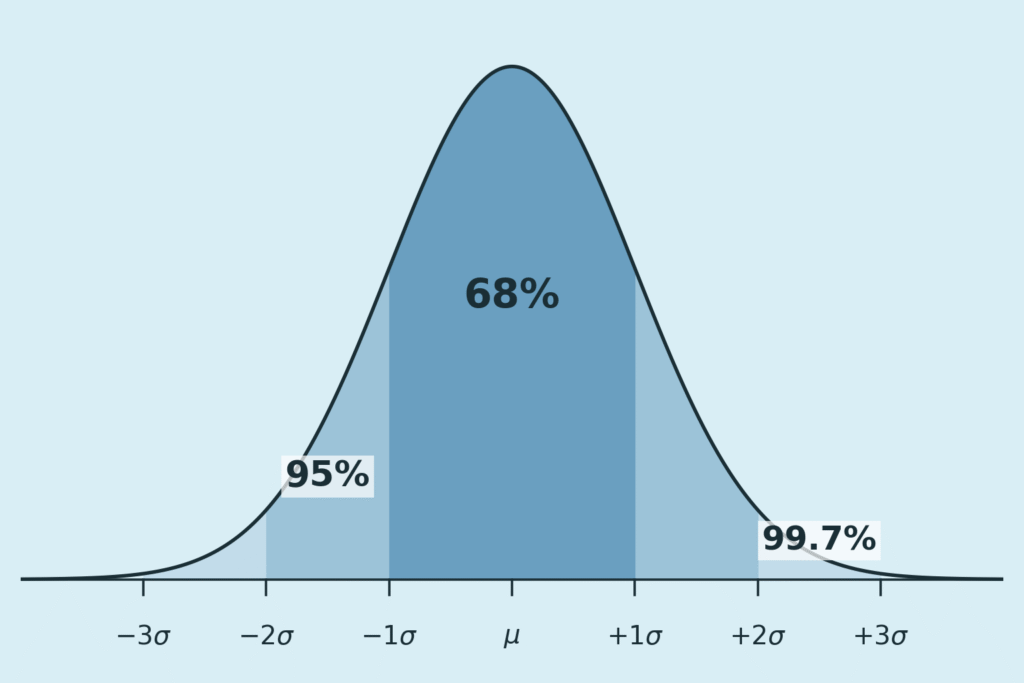
Central band (darkest shade): the band within 1 standard deviation of the mean holds 68% of values — the typical range the calculator reports first.
Next bands out (medium shade): extending to 2 standard deviations adds another 27%, bringing the total to 95%.
Outer bands (lightest shade): the bands between 2 and 3 standard deviations add a further 4.7%, bringing the total to 99.7%.
The tails: the tiny slivers beyond 3 standard deviations hold only about 0.3% of values — these are extreme outliers.
Reading Your Results
Match your value against the chart to judge it at a glance:
- Typical — inside the central 68% band.
- Unusual — outside the 95% range, more than 2 standard deviations from the mean; worth a second look.
- Extreme — outside the 99.7% range, more than 3 standard deviations from the mean; check for a data-entry error or a genuine outlier.
When the rule does not apply
The 68–95–99.7 ranges only hold for data that are roughly bell-shaped and symmetrical. Do not rely on them when:
- your data are skewed — bunched to one side with a long tail on the other, such as incomes;
- your data have two peaks — for example, two different groups measured together;
- your sample is small, or a few outliers are distorting the mean and standard deviation;
- your data simply do not follow a normal distribution.
If you are unsure whether your data are bell-shaped, run a normality check before trusting the ranges. For data that are not normal, Chebyshev’s theorem gives a safer, more general guarantee instead.
Frequently Asked Questions
Enter your mean in the Mean box, enter your standard deviation in the Standard Deviation box, then press Calculate. The calculator shows the 68%, 95% and 99.7% ranges at once, and redraws the shaded bell curve for your numbers.
They show where most of your values fall. For example, with a mean of 100 and a standard deviation of 15, about 68% of values fall between 85 and 115, about 95% between 70 and 130, and about 99.7% between 55 and 145.
The mean is the average of your data. The standard deviation measures how spread out the data are: a small standard deviation means values cluster close to the mean, while a large one means they are more spread out.
Only as a rough guide, and only when your data are roughly bell-shaped and symmetrical. The rule does not hold for skewed data, data with two peaks, or data with many extreme values.
No, they are rounded. The more precise figures are 68.27%, 95.45% and 99.73%, so treat the calculator’s ranges as close estimates rather than exact counts.
The peak of the curve sits at your mean. The darkest central band covers 1 standard deviation either side of the mean, the next bands out reach 2 and 3 standard deviations, and the thin tails beyond 3 standard deviations hold only about 0.3% of values.
The empirical rule only applies to normal, bell-shaped distributions, where it gives the 68–95–99.7 split. Chebyshev’s theorem works for any distribution, but it only guarantees at least 75% of values within 2 standard deviations of the mean — a weaker, more general promise.
First check your inputs, especially that the standard deviation is greater than 0. Then check whether your data are roughly bell-shaped. A value far outside the 99.7% range may be an outlier — or a data-entry error.
Related Resources
Explore these resources to deepen your understanding of the empirical rule and related concepts:
- What the empirical rule means: the 68-95-99.7 rule explained
- How to Use the Empirical Rule on a Calculator: Step-by-step guide to mastering this tool.
- Empirical Rule vs. Chebyshev’s Theorem: Compare these statistical tools for better analysis.
- Applications of the Empirical Rule in Statistics and Probability: Discover real-world uses.
- Normal Distribution and the Empirical Rule: Comprehensive insights into normal distributions.
- All Tools: Browse our full collection of statistical calculators.
Empirical Rule Graph Generator
Visualize the 68-95-99.7 Rule with a bell curve showing standard deviation intervals. Great for quick insights and presentations.
Try CalculatorBell Curve Generator
Create customizable bell curve plots for any normal distribution. Perfect for data analysis and visual reports.
Standard Deviation Shading Calculator
Shade areas under the curve based on standard deviation. Instantly see data coverage between values.
Try CalculatorZ-Score to Graph Plotter
Plot Z-scores on a bell curve and see where your value lies. Understand percentiles and probabilities at a glance.
Try CalculatorEmpirical Rule Percentile Calculator
Quickly estimate percentiles in a normal distribution using the 68-95-99.7 rule. Input mean, standard deviation, and a score to find its percentile rank.
Try CalculatorZ-Score to Percentile Converter
Convert a z-score to a percentile in a normal distribution. Enter your z-score to see the percentage of data below it, ideal for test scores or analytics.
Try CalculatorPercentile Rank Calculator
Find your score’s percentile rank without needing mean or standard deviation. Input your score and rank to see where you stand in any dataset.
Try CalculatorNormal Distribution to Percentile Visualizer
Visualize your score on a bell curve with shaded percentile areas. Enter mean, standard deviation, and a score to see its rank in a normal distribution.
Try CalculatorEmpirical Rule Probability Finder
Calculate probabilities under a normal distribution using the 68-95-99.7 rule with easy inputs and visual bell curve outputs.
Try CalculatorLeft/Right Tail Probability Calculator
Find left or right tail probabilities in a normal distribution using z-scores, perfect for hypothesis testing and p-values.
Try CalculatorProbability to Z-Score Approximation Tool
Convert cumulative probabilities to z-scores in a normal distribution, ideal for test scores and data analysis.
Try CalculatorEmpirical Rule Confidence Interval Calculator
Estimate data ranges using the 68-95-99.7 rule. Enter mean and SD to get ±1σ, ±2σ, or ±3σ intervals instantly.
Try CalculatorConfidence Interval from Mean and Standard Deviation Calculator
Compute exact confidence intervals from sample data. Input mean, SD, and sample size for 90%, 95%, or 99% CI.
Try CalculatorEmpirical Rule Range Probability Calculator
Estimate range probability between two values using the Empirical Rule (68-95-99.7). Ideal for quick normal distribution approximations without z-scores.
Try CalculatorEmpirical Rule Middle % Probability Calculator
Calculate middle percentages like 68% or custom central ranges in normal distributions with the Empirical Rule. Perfect for visualizing data clustering around the mean.
Try CalculatorEmpirical Rule Custom Zone Calculator
Empirical Rule Custom Zone Calculator Create and calculate custom zones like -3σ to -1σ in normal distributions using the Empirical Rule. Approximate probabilities for segmented bell curve analysis.
Try CalculatorEmpirical Rule Outlier Detector
Quickly identify mild and extreme outliers using ±2σ and ±3σ thresholds in normal distributions, with Z-scores and bell curve visuals for clear analysis.
Try CalculatorOutlier Threshold Calculator (Mean ± k·SD Tool)
Customize outlier boundaries with any k-value for flexible detection, ideal for analysts adjusting sensitivity in datasets like exam scores or quality checks.
Try CalculatorNormality Check Before Outlier Detection Tool
Assess if your data fits a normal distribution via skewness, kurtosis, and histograms—essential before applying empirical rule methods to avoid errors.
Try CalculatorEmpirical Rule Extreme Value Finder
Rank data points by extremeness beyond 2 SD, 2.5 SD, and 3 SD, classifying them as moderately extreme, very extreme, or highly unusual with tail visualizations.
Try CalculatorStandard Deviation Percentage Contribution Calculator
Break down variance in normal distributions by SD bands (0–1σ, 1–2σ, etc.), revealing each zone's share of total spread with clear examples and insights.
Try Calculator