Left/Right Tail Probability Calculator
Calculate probabilities in the left or right tail of a normal distribution
Left/Right Tail Probability Calculator
Calculate probabilities in the left or right tail of a normal distribution
Enter the mean (μ), standard deviation (σ), and threshold value:
Results:
Z-Score: 1.5
Probability: 0.0668
Use the tool above for a single cut-off: enter a mean, a standard deviation and a threshold value, choose the left or the right tail, and read the z-score and the probability in Results. It is a one-tail tool, so it gives the area beyond that one cut-off only, which is exactly what a one-tailed p-value needs.
Author:
Dr. Jane Smith, Statistician with over a decade of experience in statistical education and data analysis.
What Is Tail Probability?
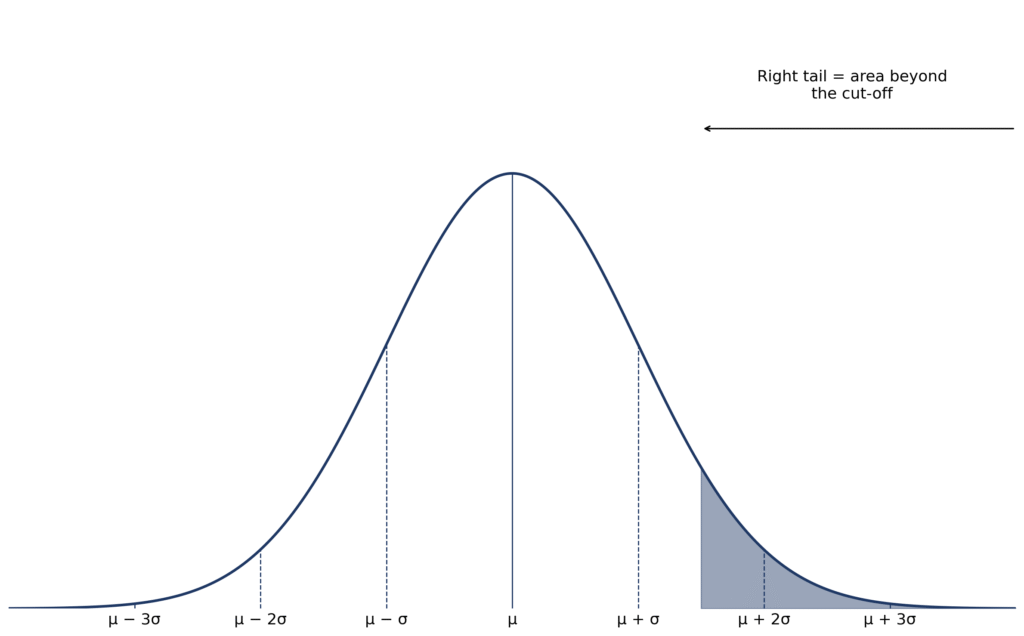
Tail probability is the area under a normal curve in one extreme end beyond a single cut-off. The left tail is P(X ≤ threshold), the area below the cut-off; the right tail is P(X ≥ threshold), the area above it.
Because the total area under a normal curve is 1, the two tails for the same cut-off add to 1, so either tail is 1 minus the other. This page is the one-tail tool: it answers “how likely is a value above this cut-off?” or “below this cut-off?”, not “how likely is a value in the middle?”. The cut-off is converted to a z-score with z = (threshold − mean) / standard deviation, so the tail is read from the standard normal curve.
For example, z = 2 has a right tail of about 0.0228 (2.28%): about 2.3% of values lie above 2 standard deviations above the mean, and about 97.72% lie below it. To see the shape of the curve, try the bell curve generator.
How to Use the Left/Right Tail Probability Calculator
This one-tail calculator finds the probability in one side only. It has no two-tailed option and no separate z-score field: the z-score is worked out for you from the values you enter.
- Enter the mean, standard deviation and threshold value: for example, mean 0, standard deviation 1 and threshold 1.5. To use a raw score, enter its own mean and standard deviation, and the tool converts the threshold to a z-score.
- Choose the tail: Left Tail (P(X ≤ threshold)) for the area below the cut-off, or Right Tail (P(X ≥ threshold)) for the area above it.
- Click “Calculate Probability”: read the Z-Score and Probability in Results. With mean 0, standard deviation 1 and threshold 1.5, the right tail is 0.0668, about 6.68%.
- Interpret the result: the probability is the share of the distribution in that tail, for example when checking a p-value or a cut-off. The left and right tails for the same cut-off add to 1.
For quick approximations, compare results with our probability guide.
Disclaimer: Results assume a normal distribution. For non-normal data, consult a statistician.
Real-Life Examples of Left and Right Tail Probabilities
Example 1: SAT Score Above a Value
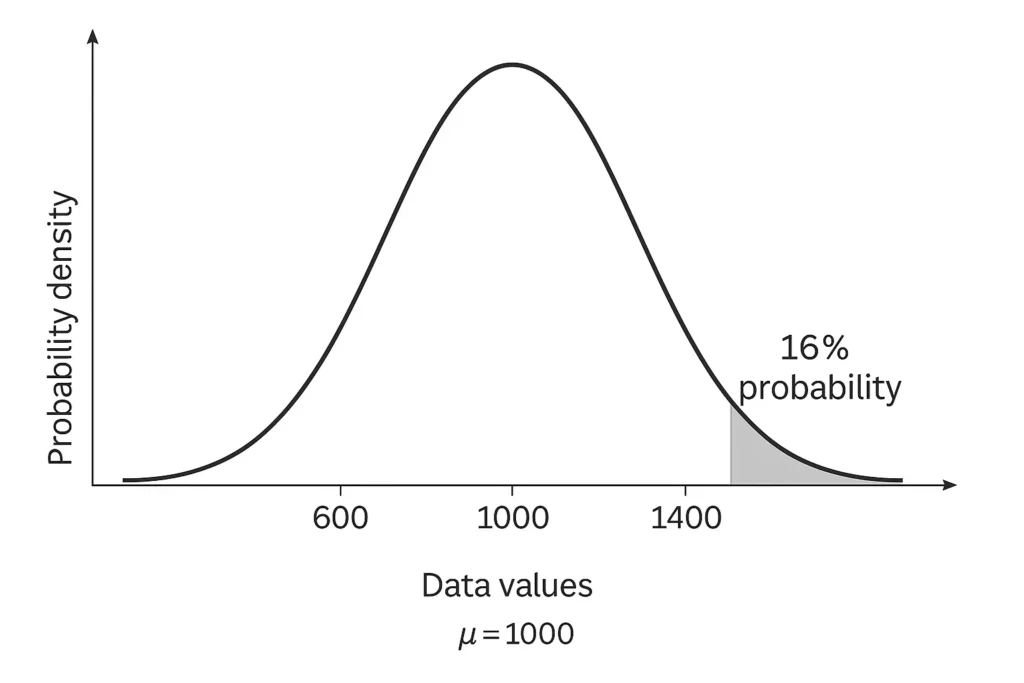
Problem: SAT scores have a mean of 1000 and a standard deviation of 200. What is the probability of scoring above 1200?
- Enter the values: mean 1000, standard deviation 200, threshold 1200, and choose Right Tail.
- Z-score: z = (1200 − 1000) / 200 = 1.
- Right tail probability: the tool gives 0.1587, which is 15.87%, about 16%. The check is 1 − 0.8413 = 0.1587, because 84.13% lie below z = 1.
- Interpretation: about 16% of students score above 1200.
Example 2: Height Below a Value
Problem: Adult male heights have a mean of 175 cm and a standard deviation of 7 cm. What is the probability of a height below 161 cm?
- Enter the values: mean 175, standard deviation 7, threshold 161, and choose Left Tail.
- Z-score: z = (161 − 175) / 7 = −2.
- Left tail probability: the tool gives 0.0228, which is 2.28%, about 2.3%.
- Interpretation: about 2.3% of men are shorter than 161 cm.
Example 3: One-Tailed Hypothesis Test
Problem: For a standard normal distribution (mean 0, standard deviation 1), what is the probability of a value above 1.96?
- Enter the values: mean 0, standard deviation 1, threshold 1.96, and choose Right Tail.
- Z-score: z = (1.96 − 0) / 1 = 1.96.
- Right tail probability: the tool gives 0.0250, which is 2.5%.
- Interpretation: only 2.5% of values lie above 1.96. This is why 1.96 is a familiar 95% confidence cut-off: a two-tailed test would double this one-tail value, 2 × 0.025 = 0.05, or 5%, but this tool has no two-tailed option, so that doubling must be done by hand.
For related calculations, try our z-score approximator.
Left vs Right Tail: What’s the Difference?
| Feature | Left Tail | Right Tail |
|---|---|---|
| Definition | Area to the left of a z-score (values below) | Area to the right of a z-score (values above) |
| Use Case | Lower-tail hypothesis tests (e.g., testing if values are below a threshold) | Upper-tail tests (e.g., testing if values exceed a threshold) |
| Example | Probability of scoring below 800 on SAT | Probability of scoring above 1200 on SAT |
When to use each side: choose the side from the question, not from the result. Use the left tail when the question is “below this cut-off?”, and the right tail when it is “above this cut-off?”.
- Left-tailed test: for questions such as “Is the mean less than X?” — for example, testing whether a drug reduces recovery time.
- Right-tailed test: for questions such as “Is the mean greater than X?” — for example, testing whether a training programme improves scores.
Left/Right Tail Probability and Z-Scores
Z-scores measure how far a value is from the mean in standard deviations: z = (threshold − mean) / standard deviation. That score is the link to the tail area under a normal curve. In a standard normal distribution (mean = 0, standard deviation = 1):
- Positive z-scores: the far right tail is small — for example, z = 1.96 has a right tail of 2.5%, while its left tail is 97.5%.
- Negative z-scores: the far left tail is small — for example, z = −1.96 has a left tail of 2.5%, while its right tail is 97.5%.
Traditionally, standard normal tables give the cumulative probability (the area to the left of z). For a right tail, subtract from 1: P(Z > z) = 1 − P(Z < z). This tool does that step for you. To see a z-score plotted on a curve, use our z-score graph plotter.
When Should You Use Tail Probabilities?
Tail probabilities are useful when the question concerns one extreme side only:
- One-tailed hypothesis testing: finding p-values for directional tests, for example “Is the mean higher than X?”.
- Confidence intervals: finding critical values, for example z = 1.96 for 95% confidence.
- Risk management: estimating the probability of extreme losses in one tail.
- Outlier detection: flagging rare values, for example values beyond z = ±3.
- Empirical rule context: estimating extreme probabilities beyond the 68–95–99.7 rule.
For the 68–95–99.7 context, see our empirical rule graph generator.
Tail probability as a p-value: in a one-tailed test, the p-value is the tail area in the direction stated before the test. For example, a right tail of 0.0250 gives a one-tailed p-value of 0.025. A two-tailed p-value doubles that one-tail area, 2 × 0.025 = 0.05, but this tool has no two-tailed option, so that doubling must be done by hand.
Common misconceptions:
- A tail probability is a share of the distribution, not the z-score itself.
- A p-value is not the probability that the null hypothesis is true; in a test it is the tail area for a result at least as extreme, assuming the null distribution.
- Choosing the tail after seeing the result can mislead; choose the direction from the question, before the test.
- Left and right tails for the same cut-off add to 1, so a small tail on one side means a large area on the other — it does not mean the whole distribution is small.
FAQs
Left tail probability is the area under the normal curve to the left of a z-score, representing the likelihood of values below that point.
Cumulative probability is the area to the left of a cut-off, so it is the same as the left tail. The right tail is 1 minus that cumulative area. “Tail probability” simply names whichever one side you need: left or right.
Yes. You do not need to enter a z-score: enter the mean, standard deviation and threshold value, choose the tail, and the tool works out the z-score and the tail probability.
In a one-tailed test, the tail area in the direction stated before the test is the p-value: it is the probability of a result at least as extreme, assuming the null distribution.
In one-tailed tests, the tail area is the p-value from z-score. For two-tailed tests, double the tail probability.
Right tail probability is the area under the normal curve to the right of a cut-off, P(X ≥ threshold): the likelihood of a value above that point. For example, with mean 1000 and standard deviation 200, the right tail above 1200 is 0.1587, about 16%.
Choose from the question, not from the result. Choose Left Tail if the question asks about values below the cut-off, and Right Tail if it asks about values above the cut-off. In a test, state the direction before you run the test.
Yes, for the same cut-off. The left tail is the area below it and the right tail is the area above it, and together they cover the whole curve, so they add to 1. For example, a left tail of 0.9332 and a right tail of 0.0668 add to 1.0000.
Conclusion
Use this one-tail tool whenever the question is about one side of a cut-off only: enter the mean, standard deviation and threshold, choose Left Tail or Right Tail, and read the z-score and probability. For a worked method, see our probability guide; to convert a probability back to a cut-off, try our z-score approximator; and for the 68–95–99.7 context, see our empirical rule graph generator.
Check Our Other Tools:
Empirical Rule Graph Generator
Visualize the 68-95-99.7 Rule with a bell curve showing standard deviation intervals. Great for quick insights and presentations.
Try CalculatorBell Curve Generator
Create customizable bell curve plots for any normal distribution. Perfect for data analysis and visual reports.
Standard Deviation Shading Tool
Shade a chosen range on a normal curve by standard deviation and read its percentage.
Try CalculatorZ-Score Graph Plotter
Plot Z-scores on a bell curve and see where your value lies. Understand percentiles and probabilities at a glance.
Try Calculator