Z-Score Graph Plotter
Results
Enter z-score values and click "Plot Graph" to see the results.
A z-score tells you how far a data point is from the average in a normal distribution, and our z-score to graph plotter brings this concept to life by plotting it on a bell curve. Enter a z-score, choose Left Tail, Right Tail or Between, then click Plot Graph to shade the matching area and read its probability and percentile on a standard normal distribution graph. Perfect for students, educators, and analysts, this tool makes it easy to see where data points fall and calculate percentiles. This guide explains z-scores, how to use the plotter, and why visualisation matters. Curious to explore? Start with our main statistics tool to see data distributions in action.
What Is a Z-Score?
A z-score measures how many standard deviations a data point is from the mean in a normal distribution. It is calculated as:
[ Z = \frac{x – \mu}{\sigma} ]
Where:
x is the data point.
μ (mu) is the mean (average).
σ (sigma) is the standard deviation, showing data spread.
For example, if test scores have a mean of 80 and a standard deviation of 5, a score of 85 has a z-score of (85 – 80) / 5 = 1, meaning it is one standard deviation above the mean. A z-score visualizer helps you see this position on a bell curve, making it easier to understand data relative to the average. To see how shaded standard-deviation regions work, use the standard deviation shading tool.
How the Z-Score Graph Plotter Works
The z-score to graph plotter is a simple tool to plot a z-score on a normal curve. Here is how to use it:
Choose the Calculation Type: pick Left Tail (P(Z ≤ z)), Right Tail (P(Z ≥ z)), or Between (P(z₁ ≤ Z ≤ z₂)).
Enter the Z-Score: type your z-score in the Z-Score 1 field. For Between, enter a second z-score as well.
Plot the Graph: click “Plot Graph” to mark the z-score on the bell curve and shade the matching area.
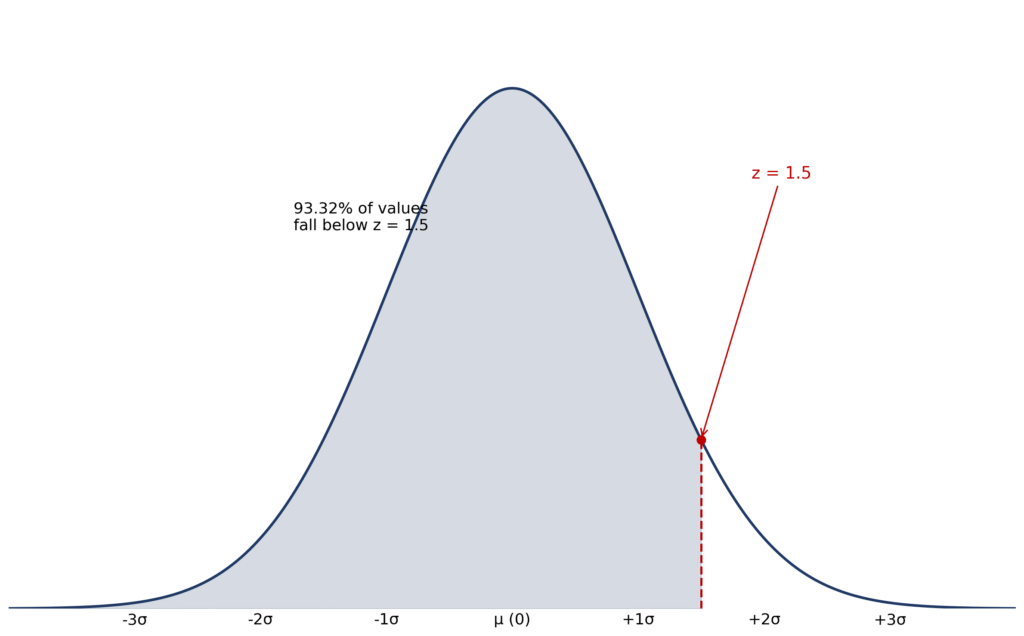
Read the Result: read the probability and percentage under Results. For example, z = 1.5 with Left Tail gives P(Z ≤ 1.5) = 0.9332, or 93.32%.
Download (Optional): click “Download Chart as PNG” to save the chart.
Example: if you start from a raw score, convert it first with z = (x − μ) / σ. For a test score of 90 with a mean of 80 and standard deviation of 10, the z-score is (90 − 80) / 10 = 1, which sits at about the 84th percentile (84.13% below).
Why Visualizing Z-Scores Matters
Visualizing z-scores with a z-score bell curve offers several benefits:
Clarifies Data Position: Shows how far a value is from the mean, making it easier to interpret outliers or typical values.
Estimates Percentiles: The shaded area under the curve indicates the percentage of data below a z-score, useful for ranking.
Enhances Learning: Helps students grasp statistical concepts through clear, interactive visuals.
Supports Analysis: Analysts can assess data significance in fields like education or finance.
For example, a teacher might plot a student’s z-score to show their rank in a class, while a researcher could visualise measurement deviations. Explore more with our empirical rule graph generator or bell curve generator.
Real-Life Use Cases
The z-score visualizer is practical in many scenarios:
Use Case 1: Academic Performance
A class’s exam scores have a mean of 75 and a standard deviation of 8. A student scores 83, giving a z-score of (83 – 75) / 8 = 1. Plotting this on the graph shows the score is one standard deviation above the mean, in the top 16% (since 84% of data is below z = 1). This helps teachers identify high performers.
Use Case 2: Quality Control
A factory produces bolts with a mean length of 10 cm and a standard deviation of 0.2 cm. A bolt measuring 10.4 cm has a z-score of (10.4 – 10) / 0.2 = 2. The plotter shows this is in the top 2.5%, flagging it as a potential outlier for inspection.
Use Case 3: Health Metrics
Blood pressure readings have a mean of 120 mmHg and a standard deviation of 10 mmHg. A reading of 140 mmHg has a z-score of (140 – 120) / 10 = 2. The graph shows this is unusually high, in the top 2.5%, aiding medical assessments.
How to Read a Z-Score Graph
The curve on this graph is the standard normal distribution: a bell curve with a mean of 0 and a standard deviation of 1. Every z-score is a position on the horizontal axis, measured in standard deviations from the mean at the centre.
When you plot a z-score, the tool marks its position on the curve and shades the area under the curve on the side you choose. That shaded area is the key to reading the graph: it equals the probability of a value falling in that region, and read as a percentage it is also the percentile. A negative z-score sits to the left of the mean (below average), and a positive z-score sits to the right (above average). The further a z-score is from 0, the more unusual the value.
Left-Tailed, Right-Tailed and Two-Tailed Results
Left-tailed — P(Z ≤ z): This is the area under the curve to the left of your z-score: the probability that a value falls at or below it. For z = 1.5, the left tail is 0.9332, so about 93.32% of values lie below z = 1.5. Use the Left Tail option when you want a cumulative probability or a percentile.
Right-tailed — P(Z ≥ z): This is the area under the curve to the right of your z-score: the probability that a value is at or above it. For z = 1.5, the right tail is 0.0668, or 6.68%. For any z-score, the left and right tails always add up to 1 (100%).
Two-tailed — P(|Z| > z): This is the combined area in both outer tails: above +z and below −z. For z = 1.5, it is 6.68% + 6.68% = 13.36%, written P(|Z| > 1.5) = 0.1336. To see the middle area instead, choose the Between option with z₁ = −1.5 and z₂ = 1.5, which gives 86.64%.
Worked Example: Plotting z = 1.5
- Enter 1.5 in the Z-Score 1 field at the top of this page.
- Choose Left Tail (P(Z ≤ z)) as the Calculation Type.
- Click Plot Graph — the curve shades the whole area to the left of z = 1.5.
- Read the result: P(Z ≤ 1.5) = 0.9332, shown as a percentage of 93.32%.
- Interpret it: z = 1.5 sits at about the 93rd percentile, so roughly 93% of values in the distribution fall below it.
Z-Score Graph for Z-Tests
In hypothesis testing, a z-test asks whether an observed result is too extreme to be explained by chance. The test statistic is a z-score, and it can be plotted on exactly the same standard normal graph used above. The key area is the rejection region: the tail area (or areas) beyond the critical value. If your test statistic falls inside a rejection region, you reject the null hypothesis.
For a two-tailed test at the 5% significance level (α = 0.05), the critical values are ±1.96, so the rejection region is the 2.5% in each tail, beyond z = +1.96 and below z = −1.96. To visualise it with this plotter, enter 1.96, choose Right Tail, and the shaded 2.5% is the right-hand rejection region (the left-hand one is its mirror image). More generally, the shaded tail area for your own test statistic is its p-value: if the p-value is smaller than α, the result is statistically significant.
Common Z-Scores and Percentiles
The table below lists the cumulative percentile — the percentage of values that fall below each z-score — for the z-scores students use most often:
| Z-Score | Percentile (percentage below) |
|---|---|
| −3 | 0.13% |
| −2 | 2.28% |
| −1 | 15.87% |
| 0 | 50% |
| 1 | 84.13% |
| 2 | 97.72% |
| 3 | 99.87% |
Note the symmetry: because the standard normal curve is symmetrical about 0, each negative z-score’s percentile mirrors a positive one — the percentile for −1 (15.87%) is 100% minus the percentile for +1 (84.13%).
Common misconceptions
A negative z-score is not a mistake. It simply sits below the mean: z = −1 is at the 15.87th percentile, not at −15.87%.
A z-score is not a percentage. z = 1.5 is not 1.5% or 150%; its percentile comes from the shaded area, which is 93.32% below it.
The shaded area is a probability, not a count. 0.9332 means 93.32% of values in a normal distribution fall below z = 1.5; it does not guarantee that 93 out of any 100 people will.
A larger z-score does not always mean a better result. Direction matters: in quality control, a value far from the mean can be a defect, even if its z-score is large.
The plotter does not prove your data are normal. It plots on the standard normal curve, so if your data are not normally distributed, the percentiles are only approximate.
If you only need the number without the graph, use the z-score to percentile converter. To compare left and right tails for the same z-score, use the left/right tail probability calculator. If you started from a probability instead, the probability to z-score approximation tool works backwards. For the difference between the two ideas, see percentile vs probability, and for worked real-life examples, see real-life applications of percentiles in the normal distribution.
FAQs
It’s a tool that plots a z-score on a standard normal distribution graph, showing its position on a bell curve and related percentiles.
A z-score shows how far a data point is from the mean in standard deviations, and the z-score bell curve visualizes this position.
You only need a z-score and a calculation type: choose Left Tail, Right Tail or Between, enter your z-score in the Z-Score 1 field (a second z-score for Between), then click Plot Graph. No mean or standard deviation is needed, because the tool plots on the standard normal distribution, which already has a mean of 0 and a standard deviation of 1. If you start from a raw score, convert it first with z = (x − μ) / σ.
Yes, it can shade area under curve z-score to show the percentile from z-score, like the percentage of data below a value.
It visualizes where data points fall in a normal distribution, aiding in understanding rankings or outliers.
Yes. Enter your test statistic as the z-score and the graph draws it on the standard normal curve, shading the tail area beyond it. That shaded tail area is the p-value region. For a two-tailed test, check both tails — the area beyond your z-score and the equal area beyond its negative on the other side of the curve.
It sits to the left of the mean (0), so it is below average. For example, z = −1 is at the 15.87th percentile: 15.87% of values fall below it and 84.13% fall above it. A negative sign is not an error; it only tells you the direction from the mean.
Yes. After you plot a z-score, click “Download Chart as PNG” below the chart to save the plotted graph as a PNG image (z-score-graph.png), ready to use in homework or a report.
Bell Curve Generator
Generate a bell curve from any mean and standard deviation. Read the statistics and download the chart.
Try CalculatorZ-Score to Percentile Converter
Convert any z-score into its percentile and cumulative probability in one click.
Try CalculatorLeft/Right Tail Probability Calculator
Work out left-tail and right-tail probabilities for any z-score under the normal curve.
Try CalculatorEmpirical Rule Calculator - 68 95 99.7 Rule of Normal Distribution
Enter mean & standard deviation to get 68%, 95% & 99.7% ranges instantly — with graph, formula & worked examples.
Try Calculator